Numbered, bookmarked binder
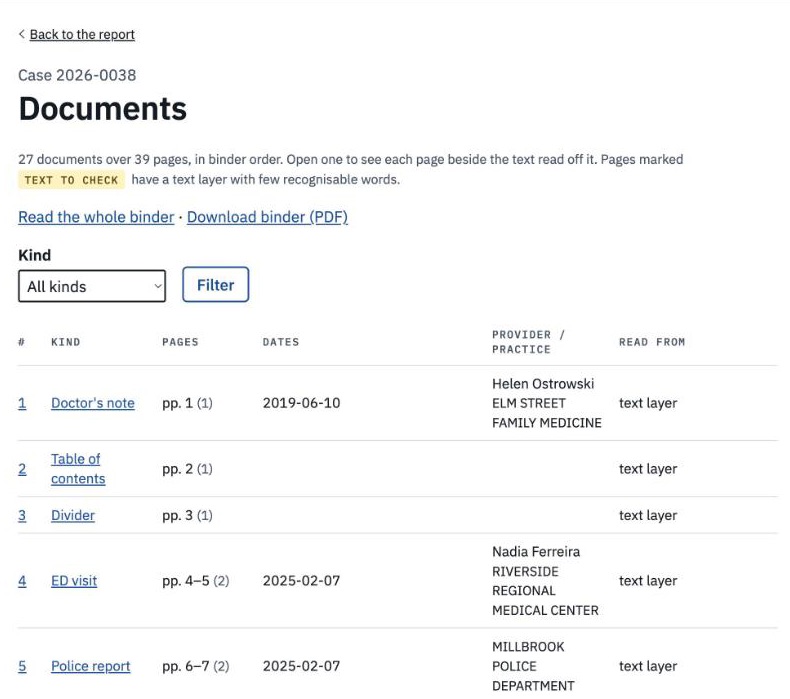
Documents in order of first date of service, pages numbered across the whole file, exact duplicates removed and listed. Scroll it in the app with a jump list by date, or download the PDF.
For independent medical examiners
IMEA reads the whole file for you. It builds one numbered, bookmarked binder and drafts your IME report on your template. Every value it fills in links to the page it came from, and nothing goes in the report until you accept it.
A single IME can arrive as hundreds of pages: vendor binders, law-firm packets, faxed office notes, scanned imaging reports, the same visit sent twice. Before you can form an opinion you have to put it in order, find the date of loss, the prior history and the gaps, and then cite it all again when you write.
IMEA does that sorting and first pass, and shows its work, so your time goes into the exam and the opinion.
How it works
Drop in the PDFs as they came, large files included. A new case can start from the files alone: IMEA reads the examinee, date of loss, firm and exam date from the records and asks you to confirm.
IMEA reads every page (scans and faxes included), splits the file into documents, drops exact duplicate pages, puts everything in date order and numbers it 1 to N, with a bookmark per document.
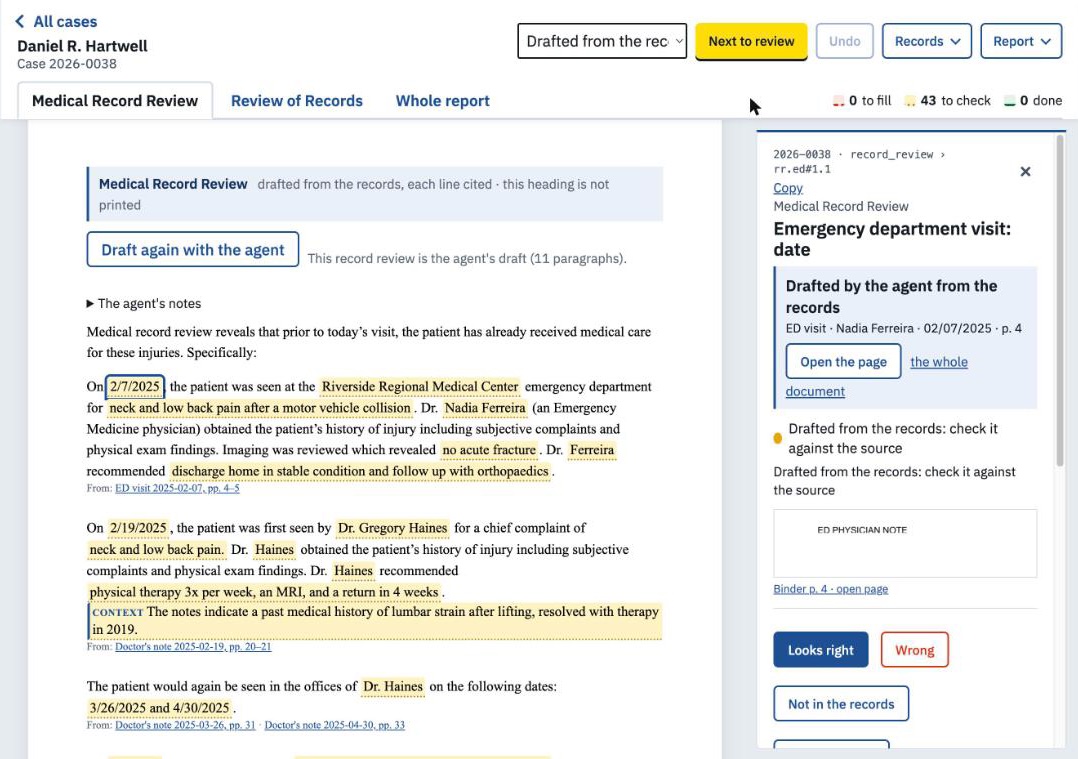
Your template comes back filled in from the records. Each value sits next to a highlighted crop of its source page. Accept, correct or reject it; “Next to review” walks you through what is left.
Download the report as a Word file on your template, with your practice’s signature lines, ready for your opinion and final edits. The stamped binder downloads as a PDF.
Features
Documents in order of first date of service, pages numbered across the whole file, exact duplicates removed and listed. Scroll it in the app with a jump list by date, or download the PDF.
Every page’s text is checked. Missing, garbled or noisy fax text is re-read with OCR, and sideways pages are straightened.
Locked, damaged or low-confidence pages are listed in one place, with a drafted request for better copies you can send to the referring firm.
Each drafted value links to its binder page. Search the records from any blank, or pick the words straight off the page and keep the citation.
Every blank is marked open, checked, flagged or left out, by colour and by underline, so nothing slips through and colour is never the only cue.
An AI drafting step writes the record review with a citation on every line, each one checked against its page. Switched on per practice.
Summarize any document in up to ten lines, each tied to a page. Lines whose words can’t be found on that page are flagged.
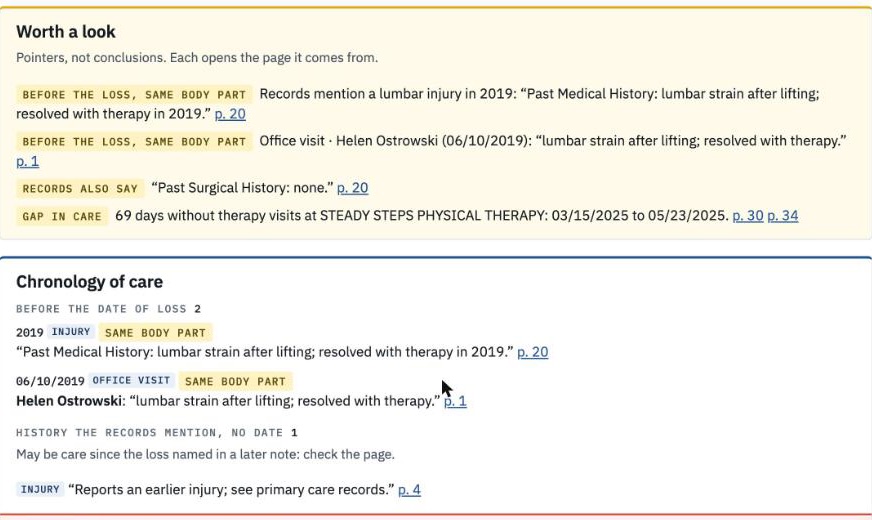
A short incident summary, visits per month, and neutral pointers worth a look, such as prior care to the same body part or conflicting statements. Pointers, not conclusions.
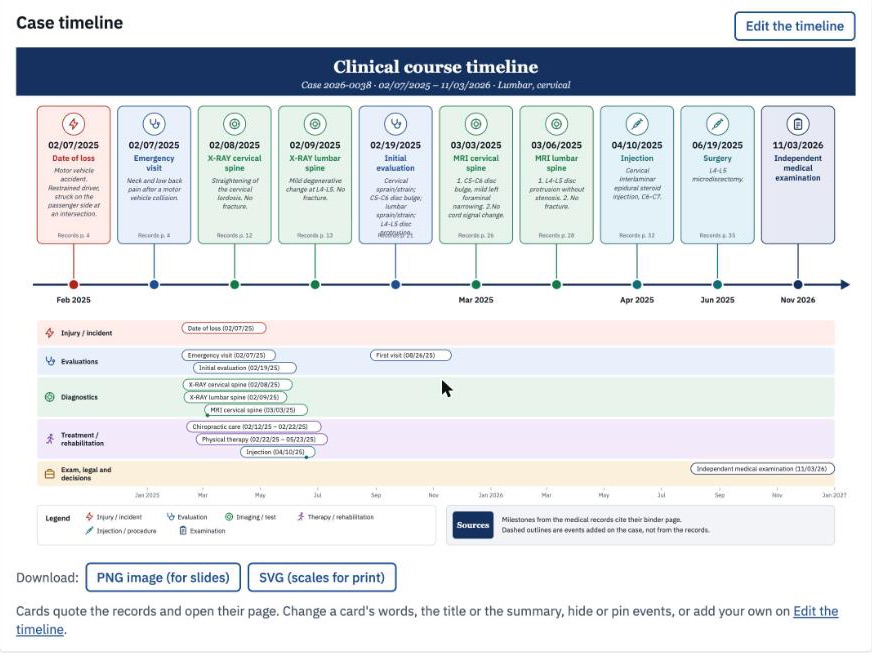
Incident, visits, imaging, therapy, procedures and legal events on one chart. Every marker opens its page. Pin, hide or add your own events.
Drafts use your own report template. Remove, repeat or reword any paragraph for a single case.
Give uploaded files a meaningful name, like “Addendums”, without changing the binder, its page numbers or citations.
Cases belong to a practice. Users see their practice’s cases only, and every review, download and export is written to an audit log.
Screens from IMEA’s demo practice. Every name and record in them is invented.
Your data
IMEA runs on Tiny Industries’ AWS account in us-west-2 (Oregon), on encrypted disks. Each uploaded file is also encrypted individually by the app.
The AI steps use Claude on Amazon Bedrock in US regions, set to keep no data and log nothing. Your records are not used to train models.
Ordering, numbering, de-duplication and the timeline are plain code. AI is used only for named drafting steps, and every result is cited for you to check.
Encrypted backups go to Amazon S3. Tiny Industries has a Business Associate Addendum in place with AWS.
Users see only their own practice’s cases. Reviews, downloads and exports are logged.
IMEA drafts; you decide. Nothing it drafts reaches the report until you accept it, and opinion sections are left to you.
Pricing
Each plan includes a monthly allowance of record pages. Pages past that are billed at the plan’s per-page rate, and no single case is ever charged more than $150.
$99/month
$799/month
$1,499/month
FAQ
No. IMEA drafts the factual parts of the report from the records: dates, history, treatment, imaging, the record review. Causation, apportionment and every other opinion are left to you.
Every drafted value carries its page citation and starts as “to review”. You see the source crop next to it and accept, correct or reject it. Nothing is final until you say so.
Yes, on the Pro and Practice plans. We set IMEA up with your template and your signature lines, and the Word export comes out in that format. Starter uses a standard template.
Yes. Pages without usable text are read with OCR, sideways pages are straightened, and anything still hard to read is listed with a drafted request for better copies.
No. The AI runs on Amazon Bedrock with no data retention, and your records are not used for training.
Only users in your practice. Each case belongs to one practice, and other practices can’t see it.
Request a demo. We walk you through a demo practice with invented cases, then set up your practice, users and template.
We’ll walk you through IMEA on invented records, then show you what it does with a case like yours.
Request a demo